
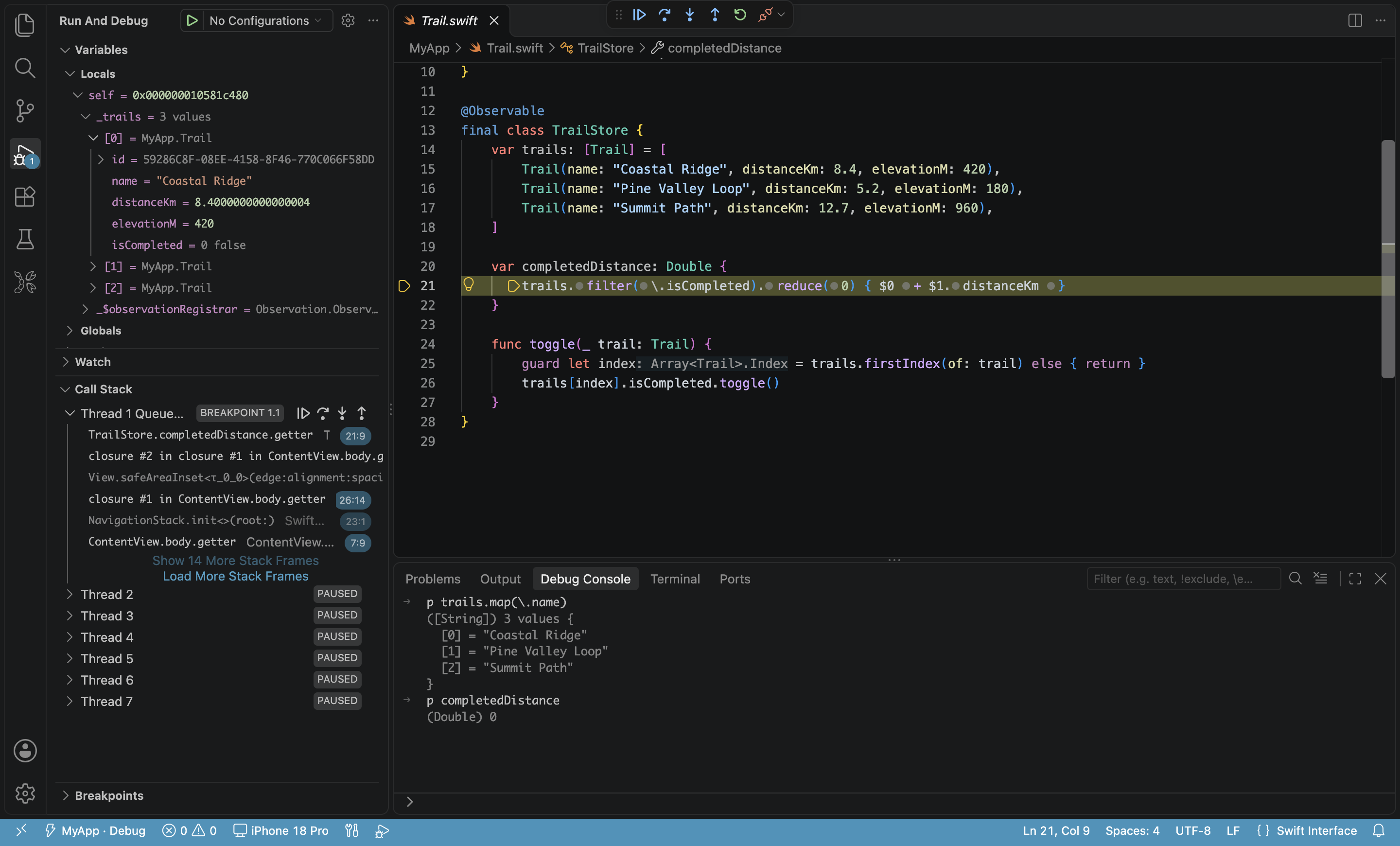
Yes, you can build iOS apps in VS Code. On a Mac with Xcode installed, VS Code handles everyday iOS app work: code completion while you write Swift, SwiftUI or Objective-C, one-key builds, and running and debugging with breakpoints on the simulator and a real iPhone. The one requirement is an extension that understands Xcode projects, such as the free KXApp. Interface Builder layout, Instruments profiling and archiving for upload still happen in Xcode. Below is a capability-by-capability breakdown, current as of October 2026.
What can you do when you build iOS apps in VS Code?
| Capability | VS Code with only the official Swift extension | VS Code + KXApp | Xcode |
|---|---|---|---|
| Swift / SwiftUI completion and navigation | Works for Swift packages; limited for Xcode projects (.xcodeproj) | Yes, opens Xcode projects directly | Yes |
| Objective-C completion | Limited | Yes | Yes |
| Build an iOS app | No | Cmd+B, errors in the Problems panel | Yes |
| Run on the simulator | No | Cmd+R | Yes |
| Run on a real iPhone | No | Cmd+R | Yes |
| Breakpoint debugging | Swift package executables | Simulator and device | Yes |
| Unit tests | Swift package tests | XCTest and Swift Testing in the Test Explorer | Yes |
| Edit Info.plist, app icons, localization, Build Settings | Source files only | Visual editors | Yes |
| Interface Builder, Instruments, archive and upload | No | No, go back to Xcode | Yes |
| Needs a Mac and Xcode | Yes, for iOS code | Yes | Yes |
How good is code completion for iOS code in VS Code?
With KXApp installed and an Xcode project open, Swift, SwiftUI, Objective-C, C and C++ all get completion, go to definition, hover docs, find references and live errors. Completion follows the project’s current scheme and run destination, and third-party libraries (Swift packages, CocoaPods) are covered after one build. There’s no extra command-line tool to install and no config file to write.
With only the official Swift extension, Swift packages work well, but Xcode projects often show partial completion and missing symbols, because the extension can’t see the project’s build settings. See the code completion guide.
Can VS Code debug iOS apps on a real iPhone?
Yes. Connect an iPhone, select it as the run destination and press Cmd+R: the extension builds, installs and launches the app, then attaches the debugger. Breakpoints, conditional breakpoints, logpoints, variables, the call stack and po in the Debug Console all work, and the app’s print / NSLog output appears in Output › kxapp Console. You can also attach to an app that’s already running on the device.
The device requirements are the same as in Xcode: the phone trusts this Mac, Developer Mode is on, and you’re signed in with an Apple ID in Xcode that can sign for the device. Steps are in run an iOS app on your iPhone, and breakpoints, logs and attaching are covered in iOS device debugging.
Compared with Xcode, what do you still need Xcode for?
- Interface Builder: visual layout for storyboards and XIBs. In VS Code you only see the source.
- Instruments: Time Profiler, Allocations and other profiling.
- Archiving and App Store upload: Product › Archive and uploading from the Organizer.
- SwiftUI preview canvas: live previews in Xcode.
It’s the same project with a shared build cache: whatever you built in VS Code doesn’t need rebuilding when you switch to Xcode, and the same goes the other way.
Who should use VS Code for iOS development?
- Developers already at home in VS Code or Cursor who want one editor, one set of shortcuts and their AI tools for iOS too.
- Developers who also write web, Flutter or React Native code and need to touch the native iOS side.
- Projects that are mostly code and debugging, with little use of Interface Builder.
If a project leans heavily on storyboards or you profile often, Xcode as the daily driver is more comfortable. For other projects, use VS Code for iOS development and switch to Xcode when you need it.
FAQ
Do I need a Mac to use VS Code for iOS development?
Yes. Building, signing and installing on an iPhone all use Xcode on a Mac, and KXApp only supports macOS.
Can an app built in VS Code be published to the App Store?
Yes. The extension builds with your own Xcode, so the project and the build output are the same as in Xcode. To publish, archive and upload from Xcode.
Can I use Xcode shortcuts in VS Code?
Yes. With KXApp installed, Cmd+R builds and runs, Cmd+B builds and Cmd+. stops, the same as Xcode. The full mapping is in Xcode shortcuts in VS Code.
Can I build iOS apps in Cursor?
Yes, just as in VS Code: search for kxapp in Cursor’s Extensions view, install it, and open your Xcode project to build, run and debug; see build iOS apps in Cursor.